2016年9月28日 星期三
[C/C++] Notepad++ 套件SourceCookifier (似source insight)
參考如下:
NotePad++中SourceCookifier插件的使用
http://fanli7.net/a/bianchengyuyan/C__/20130915/424309.html
相關參考:
notepad++ ctag

[C/C++] 使用 Visual Studio 編譯 C語言
#include <stdio.h>
void main()
{
int a = 10;
int *p = &a; //創建一個變量p容維a的地址
printf("%x", p);//印出地址
*p=5; //根據地址取出內容, 對內容賦值, *p等價於a
printf("%d,%d", *p, a);
getchar();
}
參考出處:
https://www.youtube.com/watch?v=vEhLwsuif7E&app=desktop
程式檔案:
https://drive.google.com/open?id=0B-oSnsmCU0yMV3ZiX1pBbkVmWU0
[C#] MySQL 四大功能 (新增、刪除、更新、搜尋)
//載入MySQL元件
using MySql.Data;
using MySql.Data.MySqlClient;
namespace ConnectMySQL
{
public partial class Form1 : Form
{
string dbHost = "127.0.0.1"; //資料庫位址
string dbUser = "root"; //資料庫使用者帳號
string dbPass = "xxxx"; //資料庫使用者密碼
string dbName = "TestDB"; //資料庫名稱
public Form1()
{
InitializeComponent();
MySQL_Select();
}
/// <summary>
/// 測試連結資料庫
/// </summary>
private void TestConnect()
{
// 如果有特殊的編碼在database後面請加上;CharSet=編碼, utf8請使用utf8_general_ci
string connStr = "server=" + dbHost + ";uid=" + dbUser + ";pwd=" + dbPass + ";database=" + dbName;
MySqlConnection conn = new MySqlConnection(connStr);
//MySQLCommand commn = new MySQLCommand("set names big5", conn);
// 連線到資料庫
try
{
conn.Open();
MessageBox.Show("mysql 連線成功");
}
catch
{
MessageBox.Show("mysql 連線失敗");
}
}
/// <summary>
/// 新增資料
/// </summary>
private void MySQL_Insert()
{
string connStr = "server=" + dbHost + ";uid=" + dbUser + ";pwd=" + dbPass + ";database=" + dbName;
MySqlConnection conn = new MySqlConnection(connStr);
MySqlCommand command = conn.CreateCommand();
conn.Open();
String account;
String password;
int level;
for (int i = 0; i < 10; i++)
{
account = "account" + i.ToString();
password = "password" + i.ToString();
level = i * 10;
command.CommandText = "Insert into member(account,password,level) values('" + account + "','" + password + "'," + level + ")";
command.ExecuteNonQuery();
}
Console.ReadLine();
conn.Close();
}
/// <summary>
/// 刪除資料
/// </summary>
private void MySQL_Delete()
{
string connStr = "server=" + dbHost + ";uid=" + dbUser + ";pwd=" + dbPass + ";database=" + dbName;
MySqlConnection conn = new MySqlConnection(connStr);
MySqlCommand command = conn.CreateCommand();
conn.Open();
command.CommandText = "Delete FROM member WHERE id=5";
int n = command.ExecuteNonQuery();
Console.WriteLine("共刪除 {0} 筆資料", n);
Console.ReadLine();
conn.Close();
}
/// <summary>
/// 更新資料
/// </summary>
private void MySQL_Update()
{
string connStr = "server=" + dbHost + ";uid=" + dbUser + ";pwd=" + dbPass + ";database=" + dbName;
MySqlConnection conn = new MySqlConnection(connStr);
MySqlCommand command = conn.CreateCommand();
conn.Open();
command.CommandText = "Update member SET password='1234' WHERE account='account6'";
command.ExecuteNonQuery();
Console.ReadLine();
conn.Close();
}
string[] row1 = new string[4];
object[] rows = new object[] { };
/// <summary>
/// 搜尋資料
/// </summary>
private void MySQL_Select()
{
string connStr = "server=" + dbHost + ";uid=" + dbUser + ";pwd=" + dbPass + ";database=" + dbName;
MySqlConnection conn = new MySqlConnection(connStr);
MySqlCommand command = conn.CreateCommand();
conn.Open();
String cmdText = "SELECT * FROM member WHERE level <= 90";
MySqlCommand cmd = new MySqlCommand(cmdText, conn);
MySqlDataReader reader = cmd.ExecuteReader(); //execure the reader
while (reader.Read())
{
for (int i = 0; i < 4; i++)
{
String s = reader.GetString(i);
switch (i)
{
case 0:
row1[0] = reader.GetString(i);
break;
case 1:
row1[1] = reader.GetString(i);
break;
case 2:
row1[2] = reader.GetString(i);
break;
case 3:
row1[3] = reader.GetString(i);
break;
default:
break;
}
rows = new object[] { row1 };
}
foreach (string[] rowArray in rows)
{
dataGridView1.Rows.Add(rowArray);
}
Console.Write("\n");
}
Console.ReadLine();
conn.Close();
}
}
}
參考出處:
http://roboardgod.blogspot.tw/2013/08/cmysql.html
程式檔案:
https://drive.google.com/open?id=0B-oSnsmCU0yMUDZ1c2xLOThSeWs
2016年9月16日 星期五
[C#] MySQL 運用
MySQL Connector/Net 6.2.5
Link

C# 專案 -> 參考(右鍵) -> 加入參考 -> 載入MySQL元件
using MySql.Data;
using MySql.Data.MySqlClient;
MySQL 匯出資料庫:

參考資料庫:
Link
參考出處:
[更新] C#連接MySQL
[教學] 如何使用C#存取MySQL資料庫
2016年9月13日 星期二
[C#] DataTable 使用select搜尋並修改欄位
using System;
using System.Collections.Generic;
using System.Linq;
using System.Text;
using System.Threading.Tasks;
//載入DataTable
using System.Data;
namespace DataTable_Select
{
class Program
{
static void Main(string[] args)
{
// Create a table of five different people.
// ... Store their size and sex.
DataTable table = new DataTable("School");
table.Columns.Add(new DataColumn("Number", typeof(int)));
table.Columns.Add(new DataColumn("Name", typeof(string)));
table.Rows.Add(1, "Kevin");
table.Rows.Add(2, "Justin");
table.Rows.Add(3, "Chris");
table.Rows.Add(4, "Fiona");
table.Rows.Add(5, "John");
// Search for people above a certain size.
// ... Require certain sex.
DataRow[] result = table.Select("Name = 'Fiona'");
//修改前
//DataTable table = GetTable(); // 取得資料表
foreach (DataRow row in table.Rows) // 讀取行
{
Console.WriteLine("--- Row ---"); // Print separator.
foreach (var item in row.ItemArray) // 讀取每個項目
{
Console.Write("Item: "); // Print label.
Console.WriteLine(item); // Invokes ToString abstract method.
}
}
//修改中
for (int i = 0; i < result.Length; i++)
{
Console.WriteLine(result[i][0] + "\t" + result[i][1]);
Console.WriteLine("取得搜尋的行號:"+i);
result[i][1] = "May";
}
//修改後
//DataTable table = GetTable(); // 取得資料表
foreach (DataRow row in table.Rows) // 讀取行
{
Console.WriteLine("--- Row ---"); // Print separator.
foreach (var item in row.ItemArray) // 讀取每個項目
{
Console.Write("Item: "); // Print label.
Console.WriteLine(item); // Invokes ToString abstract method.
}
}
Console.ReadLine();
}
}
}

using System.Collections.Generic;
using System.Linq;
using System.Text;
using System.Threading.Tasks;
//載入DataTable
using System.Data;
namespace DataTable_Select
{
class Program
{
static void Main(string[] args)
{
// Create a table of five different people.
// ... Store their size and sex.
DataTable table = new DataTable("School");
table.Columns.Add(new DataColumn("Number", typeof(int)));
table.Columns.Add(new DataColumn("Name", typeof(string)));
table.Rows.Add(1, "Kevin");
table.Rows.Add(2, "Justin");
table.Rows.Add(3, "Chris");
table.Rows.Add(4, "Fiona");
table.Rows.Add(5, "John");
// Search for people above a certain size.
// ... Require certain sex.
DataRow[] result = table.Select("Name = 'Fiona'");
//修改前
//DataTable table = GetTable(); // 取得資料表
foreach (DataRow row in table.Rows) // 讀取行
{
Console.WriteLine("--- Row ---"); // Print separator.
foreach (var item in row.ItemArray) // 讀取每個項目
{
Console.Write("Item: "); // Print label.
Console.WriteLine(item); // Invokes ToString abstract method.
}
}
//修改中
for (int i = 0; i < result.Length; i++)
{
Console.WriteLine(result[i][0] + "\t" + result[i][1]);
Console.WriteLine("取得搜尋的行號:"+i);
result[i][1] = "May";
}
//修改後
//DataTable table = GetTable(); // 取得資料表
foreach (DataRow row in table.Rows) // 讀取行
{
Console.WriteLine("--- Row ---"); // Print separator.
foreach (var item in row.ItemArray) // 讀取每個項目
{
Console.Write("Item: "); // Print label.
Console.WriteLine(item); // Invokes ToString abstract method.
}
}
Console.ReadLine();
}
}
}

程式檔案:
[C#] 讀寫XML 並結合 DataTable
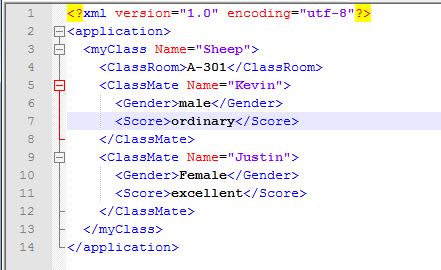
目的是設計XML格式並利用 DataTable, 寫入檔案 Default_Setting.xml
再讀取XML格式, 重新寫入 DataTable

using System;
using System.Collections.Generic;
using System.Linq;
using System.Text;
using System.Threading.Tasks;
//DataTable 載入
using System.Data;
//XElement 載入
using System.Xml.Linq;
//讀取專案路徑
using System.Windows;
//XElement 載入
using System.Xml;
//using System.Data;
namespace XML_Example
{
class Program
{
//讀取專案路徑
static string ProjectPath = System.Environment.CurrentDirectory + "\\Default_Setting.xml";
//建立新資料表
static DataTable SourceDT = new DataTable("SourceDT");
//讀取XML寫入資料表
static DataTable NewDT = new DataTable("SourceDT");
private static void Main(string[] args)
{
DataTableCreate();
XMLCreate();
ReadXML();
Console.ReadLine();
}
/// <summary>
/// 建立資料表提供XML儲存使用
/// </summary>
private static void DataTableCreate()
{
//建立資料格式
SourceDT.Columns.Add("Name", typeof(string));
SourceDT.Columns.Add("Chinese", typeof(string));
SourceDT.Columns.Add("English", typeof(string));
//新增資料
//格式: 姓名 -> 國文成績 -> 英文成績 -> 數學成績
SourceDT.Rows.Add("Kevin", "male", "ordinary");
SourceDT.Rows.Add("Justin", "Female", "excellent");
Console.WriteLine("原始DataTable資料");
//DataTable table = GetTable(); // 取得資料表
foreach (DataRow row in SourceDT.Rows) // 讀取行
{
Console.WriteLine("--- Row ---"); // Print separator.
foreach (var item in row.ItemArray) // 讀取每個項目
{
Console.Write("Item: "); // Print label.
Console.WriteLine(item); // Invokes ToString abstract method.
}
}
}
/// <summary>
/// 利用datatable轉換為XML檔案
/// </summary>
private static void XMLCreate()
{
XElement Layer1 = new XElement("application");
XElement Layer2 = new XElement("myClass");
Layer2.Add(new XAttribute("Name", "Sheep"));
Layer2.Add(new XElement("ClassRoom", "A-301"));
foreach (DataRow row in SourceDT.Rows) // 讀取行
{
XElement Layer3 = new XElement("ClassMate");
Layer3.Add(new XAttribute("Name", row[0].ToString()));
Layer3.Add(new XElement("Gender", row[1].ToString()));
Layer3.Add(new XElement("Score", row[2].ToString()));
Layer2.Add(Layer3);
}
Layer1.Add(Layer2);
XDocument xdoc = new XDocument();
xdoc.Add(Layer1);
xdoc.Save(ProjectPath);
}
private static void ReadXML()
{
//建立資料格式
NewDT.Columns.Add("Name", typeof(string));
NewDT.Columns.Add("Chinese", typeof(string));
NewDT.Columns.Add("English", typeof(string));
var allClassMates = XDocument.Load(ProjectPath).Root.Element("myClass").Elements("ClassMate");
foreach (var person in allClassMates)
{
string name = person.Attribute("Name").Value; // 屬性
string gender = person.Element("Gender").Value; // InnerText
string score = person.Element("Score").Value; // InnerText
NewDT.Rows.Add(name, gender, score);
}
Console.WriteLine("\nXML讀取寫入DataTable");
//DataTable table = GetTable(); // 取得資料表
foreach (DataRow row in NewDT.Rows) // 讀取行
{
Console.WriteLine("--- Row ---"); // Print separator.
foreach (var item in row.ItemArray) // 讀取每個項目
{
Console.Write("Item: "); // Print label.
Console.WriteLine(item); // Invokes ToString abstract method.
}
}
}
}
}
XML檔案路徑:
[專案下]\XML_Example\XML_Example\bin\Debug\Default_Setting.xml
程式檔案:
Link
參考出處:
[C# 3.0] XLinq (Linq for XML Data)
[C#]Linq to XML 讀取XML檔
[C#] MySQL 安裝
MySQL 官方網站下載:
Link
安裝教學可以參考以下二篇:
Windows上的MySQL安裝教學 (使用MySQL Installer)
[研究] MySQL 5.7 安裝 (mysql-installer-community-5.7.9.0.msi) Developer


訂閱:
文章 (Atom)